
Shop Risk - Free
Free Gifts Included
Free Shipping Worldwide
Shop Risk - Free
Free Gifts Included
Free Shipping Worldwide
Shop Risk - Free
Free Gifts Included
Free Shipping Worldwide
Shop Risk - Free
Free Gifts Included
Free Shipping Worldwide
Shop Risk - Free
Free Gifts Included
Free Shipping Worldwide
Shop Risk - Free
Free Gifts Included
Free Shipping Worldwide
Shop Risk - Free
Free Gifts Included
Free Shipping Worldwide
Shop Risk - Free
Free Gifts Included
Free Shipping Worldwide
Shop Risk - Free
Free Gifts Included
Free Shipping Worldwide
Shop Risk - Free
Free Gifts Included
Free Shipping Worldwide
Shop Risk - Free
Free Gifts Included
Free Shipping Worldwide
Shop Risk - Free
Free Gifts Included
Free Shipping Worldwide


Digipop Sliding Digital Camera
Digipop Sliding Digital Camera
Couldn't load pickup availability
 Money Back Guarantee
 Free Shipping Worldwide
 Complimentary Gifts


Specifications
Specifications
Resolution:20MP+
Max resolution:7360 × 4912
Optical zoom:16×
Screen:2.8" HD LCD
Stabilisation:Electronic
Storage:TF card
Charging:USB 2.0
Weight:98g
Dimensions:95 × 55 × 25mm
Inside Your Order
Inside Your Order
Every order will include...
- 1x Digipop Sliding Camera
- 1xUSB-C Charging Cable
- 1xBattery
- 1xInstructions Manual
- 1xWrist Strap
- 1xTravel Soft Case
Shipping Info
Shipping Info
Order Processing
Takes 1 to 2 business days to process and ship an order out.
Free Standard Shipping
Delivered within 7 to 10 business days after dispatch.
Express Shipping
Need it faster?
Express shipping is available at checkout for an additional fee, with delivery in 5 to 8 business days after dispatch.
As soon as your order is shipped, we will email you a tracking number.
If you have any questions about your order, reach out to us and we'll get back to you personally.
Returns & Refunds
Returns & Refunds
30 Day Money Back Guarantee
Not happy with your order? You have 30 days from delivery to reach out and we'll make it right.
Damaged or Faulty Orders
If your order arrives damaged or faulty, contact us within 30 days and we'll send a replacement at no cost to you.
Returns and Refunds
Returns and refunds are accepted. All cases may vary so depending on each situation, so reach out to our support team and we'll work together to find the best outcome for you.
Contact Us
Email us with your order details. We read every message personally.


Shots on the DigiPop 📸


Excellent 4.8 / 5
-
Cinematic every single time.
took this to a concert and literally every single photo cam out cinematic... nothing on my phone ever looks like this

-
Everyone asks where i got it
The pink is SO pretty in person. I've been bringing it everywhere and people keep asking where I got it.

-
The nostalgia is real omg
the tech is built modern but the photos genuinely feel like im living in the 2000's🥹

-
no complaints at all
got the silver one and its looks so sleek. solid functionality, smooth slide, gorgeous photos!!

-
came back for more...
originally bought one for myself, thennn immediately ordered one for my best friend aswell...


-

Over 56M Views On Instagram
THE NEW
Instagram Hype
see why everyone's obsessed...
FREQUENTLY ASKED QUESTIONS
FAQ's
Does it actually take good photos or is it just for the aesthetic?
Does it actually take good photos or is it just for the aesthetic?
Both. The 20MP sensor and 16× optical zoom genuinely produce sharp, detailed photo, not blurry toy-camera results. The built-in effects add the aesthetic on top, so you get quality and character in the same shot.
How does it charge and how long does the battery last?
How does it charge and how long does the battery last?
It charges via the included USB 2.0 cable, same kind used by many older Android phones. Battery life typically covers a full day of casual shooting on a single charge.
What memory card do I need and is one included?
What memory card do I need and is one included?
The camera takes a TF (micro SD) card. Some bundles include a 32GB or 64GB card with a card reader and OTG adapter, we recommend grabbing one of those bundles so you're ready to shoot straight out of the box.
Are the cameras brand new?
Are the cameras brand new?
Yes, completely. Digipop cameras are brand new, not refurbished, not a knockoff, and not a copy of anything else. We design, source, and bring these to you ourselves. Every order comes straight from production, packaged fresh and ready to go.
Why is my battery not working?
Why is my battery not working?
We've had a few customers reach out about this recently, and in almost every case the battery was simply inserted the wrong way. Pop the battery out, flip it around, and it should power on straight away. If you're still having trouble after that, reach out to us and we'll sort it.
How do I transfer the photos to my phone/computer?
How do I transfer the photos to my phone/computer?
All you need is an SD card adapter, which you can pick up anywhere, and it's as simple as plugging it in and accessing your files like any other folder.
If you ordered the SD card bundle with us, it already comes with both a USB-C adapter for your phone and a USB-A adapter for your computer, so you're covered either way right out of the box.

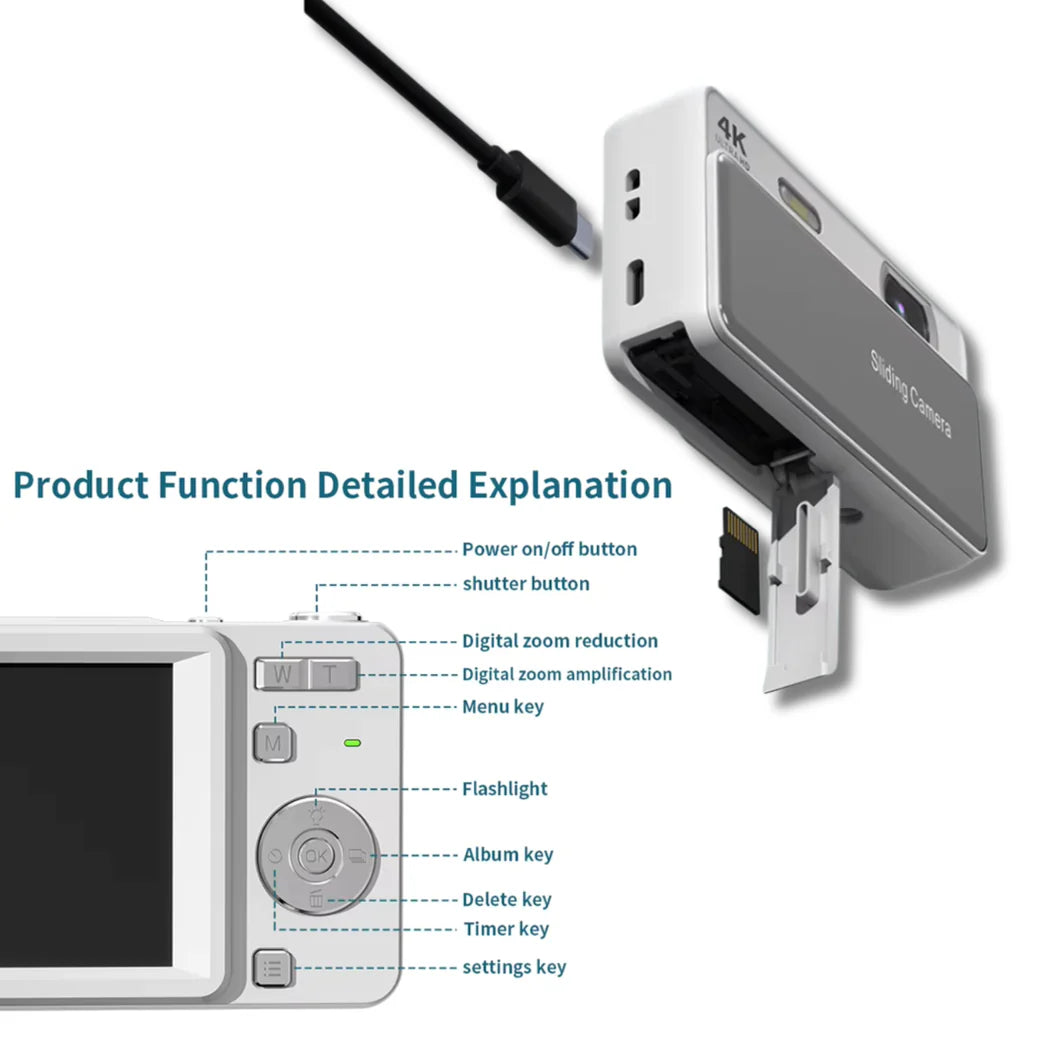
Unbox your camera and insert Battery & SD Card
Open your DigiPop, check everything is included, and slide it open for the first time.
Pop in your battery the right way and insert your SD card so you're ready to shoot.
Decorate your Digicam
Add your stickers, attach your charm, and make it yours!
Start Shooting & Transfer Footage
Charge up, power on, and start capturing every moment. make it yours.
Transfer your footage instantly using an SD card adapter or the included cable.
What our Community is Saying...
-

Very cute camera, and good price, you really do get both good photos and the nice vibe/feel with the photos at the same time! And very easy to use.
-

Absolutely love it !!!! The sliding function isn’t 100% smooth, but it still works perfectly fine. The carrying case is soft and the camera fits comfortably. Love love LOVE the size of the camera and the quality of the pictures.
-

Ordered as a birthday gift and my friend actually screamed when she opened it. not even joking. she's been using it every single day since


STEP 1
Slide open the battery cover in the direction of the arrow on the base.
Insert the battery contact end first, facing the screen until you feel it click into place.
STEP 2
Slide the battery cover closed to complete installation.
STEP 3
To remove, open the cover and press the battery latch inward until the battery releases.